
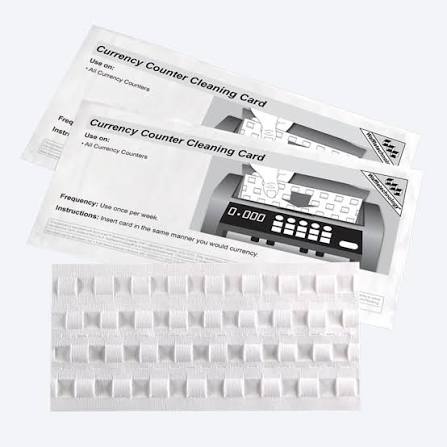
Ein Währungszähler ist ein wichtiges Werkzeug für Unternehmen, die täglich mit Bargeld umgehen. Banken, Einzelhandelsgeschäfte, Geldbearbeitungsbüros, Cash-Center und andere Unternehmen verwenden Währungszähler, um Noten schnell und genau zu zählen. Wie jede andere Maschine braucht ein Währungszähler regelmäßige Pflege. Staub, Papierfasern und Rückstände von Banknoten können sich im Laufe der Zeit in der Maschine ansammeln. Dieser Aufbau kann Sensoren, Rollen und andere Arbeitsteile betreffen.
Aus diesem Grund, Magergeldzählerreinigung sollte Teil einer regelmäßigen Wartungsroutine der Ausrüstung sein. Einen Magner-Währungszähler sauber zu halten, kann dazu beitragen, kontaminationsbedingte Zählprobleme zu reduzieren und einen zuverlässigen Betrieb zu unterstützen.
Magner produziert verschiedene Arten von Währungsverarbeitungsgeräten. Die genaue Reinigungsmethode kann je nach Modell variieren. Daher sollten Benutzer immer die Betriebs- und Wartungsanweisungen für ihre spezifische Maschine überprüfen, bevor sie sie reinigen.
Routinereinigung bedeutet nicht, die gesamte Maschine auseinander zu nehmen. In vielen Fällen beinhaltet die grundlegende Wartung die Entfernung von zugänglichem Staub und Schmutz, die Reinigung geeigneter Oberflächen, die Verwendung einer kompatiblen Geldzähler-Reinigungskarte und die Überprüfung der Maschine nach der Reinigung.
Es ist auch wichtig, den Unterschied zwischen Reinigung und Reparatur zu verstehen. Die Reinigung kann helfen, wenn Staub oder Papierpartikel den normalen Betrieb beeinträchtigen. Ein anhaltender Fehler, eine beschädigte Komponente, ungewöhnliches Geräusch oder wiederholter Stau können jedoch eine professionelle Wartung erfordern.
Dieser Leitfaden erklärt die Grundprinzipien der Reinigung von Magner-Währungszählern, welche Lieferungen nützlich sein können, häufige Fehler zu vermeiden sind und wann ein professioneller Service erforderlich sein kann.
Warum ist Magner Currency Counter Cleaning wichtig?
Währungszähler arbeiten mit einer großen Anzahl von Banknoten. Jede Note, die durch die Maschine läuft, kann winzige Papierfasern und Partikel freisetzen. Notizen können auch Staub, Schmutz und andere Rückstände aus der Lagerung und Handhabung transportieren.
Im Laufe der Zeit können sich diese Partikel in Bereichen wie Sensoren, Rollen, Zuführmechanismen und Notizpfaden ansammeln. Je häufiger eine Maschine verwendet wird, desto schneller kann dieser Aufbau auftreten.
Eine regelmäßige Reinigung ist aus mehreren Gründen wichtig.
1. Es unterstützt die Zählgenauigkeit
Ein Währungszähler muss Notizen richtig erkennen und verschieben. Sensoren spielen in diesem Prozess eine wichtige Rolle.
Wenn sich Staub oder Rückstände in Sensorbereichen ansammeln, kann die Erkennung weniger zuverlässig werden. Abhängig von der Maschine und der Art der Verschmutzung kann dies zu Zählfehlern oder anderen Betriebsproblemen beitragen.
Die Reinigung der entsprechenden Bereiche kann dazu beitragen, die Kontamination als mögliche Ursache für diese Probleme zu reduzieren.
2. Es hilft, Papier und Staubablagerungen zu reduzieren
Banknoten werden häufig behandelt. Selbst sauber aussehende Notizen können bei wiederholter Handhabung kleine Fasern freisetzen.
Eine geschäftige Cash-Handling-Umgebung kann daher im Laufe der Zeit eine erhebliche Menge an Trümmern erzeugen.
Das Entfernen loser Partikel als Teil der routinemäßigen Wartung hilft zu verhindern, dass der Aufbau übermäßig wird.
3. Es kann zuverlässigen Maschinenbetrieb unterstützen
Eine saubere Maschine ist im Allgemeinen einfacher zu inspizieren und zu warten. Wenn zugängliche Oberflächen und Notizpfade frei von übermäßigen Trümmern gehalten werden, können Benutzer Probleme leichter erkennen.
Regelmäßige Wartung kann Benutzern auch helfen, abgenutzte oder beschädigte Teile zu bemerken, bevor ein kleines Problem zu einem größeren Betriebsproblem wird.
4. Es kann zum Schutz von Ausrüstungsinvestitionen beitragen
Währungszähler sind Geschäftsgeräte. Das Ersetzen von Geräten kann teuer und störend sein.
Eine vernünftige Wartungsroutine kann dazu beitragen, das Gerät in gutem Zustand zu halten. Die Reinigung sollte jedoch niemals die erforderliche Wartung oder Reparatur ersetzen.
Der beste Ansatz besteht darin, die routinemäßige Reinigung mit den Wartungsempfehlungen für das spezifische Magner-Modell zu kombinieren.
Wie oft sollten Sie einen Magner Currency Counter reinigen?
Es gibt keinen einzigen Reinigungsplan, der für jeden Währungszähler geeignet ist.
Cleaning frequency depends on several factors. These include how often the machine is used, the number of notes processed, the condition of the notes, and the environment where the machine operates.
A machine used for a few small batches of notes each day may not need the same cleaning frequency as a machine used continuously in a high-volume cash-handling environment.
Consider the Machine’s Workload
High-volume use usually means more notes pass through the machine. More notes can mean more exposure to paper fibers and dust.
Businesses that process cash throughout the day may therefore need to inspect and clean equipment more frequently.
Lower-volume users can still benefit from routine inspection. A machine that is used less often can also collect dust when it sits unused.
Watch for Warning Signs
The machine itself can provide clues that cleaning or maintenance may be needed.
Possible signs include:
- Counting becomes less consistent.
- Notes do not feed smoothly.
- Misfeeds occur more frequently.
- The machine reports sensor-related errors.
- Notes become difficult to separate.
- Dust is visible around accessible areas.
- The machine makes an unusual sound.
- The machine requires repeated adjustments.
These symptoms do not automatically mean the machine is dirty. Mechanical wear, incorrect settings, damaged parts, or electronic problems can cause similar symptoms.
Therefore, cleaning should be considered one possible maintenance step rather than a guaranteed solution.
Follow the Specific Model Instructions
Magner has produced different currency counters with different designs and features. Cleaning access and recommended procedures may vary.
Before using any cleaning product or opening an access panel, check the documentation for the exact model.
If the manufacturer’s instructions say not to use a particular cleaning method, do not use it simply because it worked on another machine.
What You Need for Magner Currency Counter Cleaning
The right cleaning materials can make routine maintenance easier and safer.
Common supplies may include:
- A compatible currency counter cleaning card.
- A soft, lint-free cloth.
- Manufacturer-approved cleaning supplies.
- A small soft brush, when permitted.
- An approved air-cleaning method, when permitted by the manufacturer’s instructions.
The exact supplies should be selected according to the machine’s maintenance documentation.
Currency Counter Cleaning Card
A currency counter cleaning card is designed to pass through the note-feeding path of compatible machines. Its purpose is to help collect dust and residue from areas that are difficult to reach manually.
A cleaning card should only be used if it is appropriate for the machine and its instructions.
Do not assume that every cleaning card is suitable for every currency counter.
Soft, Lint-Free Cloth
A lint-free cloth is useful for cleaning accessible exterior surfaces.
Ordinary cloth may leave fibers behind. Those fibers can become another source of contamination.
Use the cloth gently. There is no need to apply excessive pressure.
Manufacturer-Approved Cleaning Supplies
If the manufacturer’s documentation specifies a particular cleaning product or method, follow those instructions.
Avoid experimenting with household chemicals. A product that is safe for a countertop may not be suitable for electronic equipment or sensor surfaces.
Soft Brush or Approved Air Cleaning
A soft brush can sometimes help remove loose dust from accessible areas.
However, users should avoid pushing dust deeper into the machine.
Compressed air should also be used only when the manufacturer’s instructions permit it. Improper air pressure or technique can move debris into areas that are difficult to clean.
Avoid Harsh Chemicals and Excessive Moisture
Electronic equipment and liquids do not mix well.
Do not pour liquid into the machine. Do not spray cleaner directly onto internal components.
If a slightly damp cloth is permitted for exterior cleaning, apply moisture carefully to the cloth rather than allowing liquid to enter the equipment.
How to Clean a Magner Currency Counter Step by Step
The following steps describe a general cleaning approach. They are not a replacement for the maintenance instructions for your specific Magner model.
1. Turn Off and Unplug the Machine
Start by stopping the machine.
Turn off the power according to the normal shutdown procedure. Then disconnect the power source if the model’s cleaning instructions call for unplugging it.
This is a basic safety step. Cleaning should not be performed while moving components are operating.
Allow the machine to stop completely before beginning maintenance.
2. Remove Dust and Loose Debris
Inspect the accessible areas of the machine.
Look for dust, paper fibers, and loose debris around the note-feeding area and other user-accessible surfaces.
Use an appropriate soft brush or other manufacturer-approved method when necessary.
Work gently.
Do not force a brush into narrow openings. Do not push debris deeper into the machine.
The goal is to remove contamination, not move it from one area to another.
If a component is difficult to reach, do not disassemble the machine unless the manufacturer specifically allows user removal.
3. Clean the Sensors
Sensors are important parts of many currency counters.
They help the machine detect notes and perform counting or related functions.
Because sensors can be sensitive, cleaning them requires care.
Use only the cleaning method recommended for the specific model.
Do not scrape sensor surfaces with hard objects.
Do not use unapproved chemicals.
Do not press heavily against delicate components.
If the sensor area appears damaged rather than dirty, cleaning may not solve the problem. In that situation, professional inspection may be appropriate.
4. Use a Currency Counter Cleaning Card
A compatible cleaning card can be useful for routine maintenance.
The general process is to prepare the machine according to its instructions and allow the cleaning card to pass through the appropriate note-feeding path.
The card can collect dust and residue from parts of the feeding system.
However, the exact procedure depends on the machine design.
Follow the cleaning card instructions and the Magner model’s maintenance instructions.
Do not add chemicals to a cleaning card unless the manufacturer specifically instructs you to do so.
A cleaning card is intended for cleaning. It should not be treated as a substitute for mechanical inspection.
5. Clean the Exterior
After internal-access cleaning is complete, clean the outside of the machine.
Use a soft, lint-free cloth.
If the manufacturer’s instructions permit a slightly damp cloth, use only a small amount of moisture.
Keep liquid away from openings, switches, displays, electrical connections, and internal components.
Pay attention to areas that users frequently touch. Keeping the exterior clean can also make routine inspection easier.
6. Inspect and Test the Machine
Before returning the machine to normal operation, inspect it carefully.
Check whether visible dust or debris remains.
Make sure there are no loose cleaning materials inside the machine.
Reconnect the equipment according to the normal operating procedure.
Then run a small test batch of notes.
Observe how the notes feed through the machine.
Watch for:
- Misfeeds.
- Jams.
- Counting inconsistencies.
- Unusual sounds.
- Error messages.
- Difficulty separating notes.
If the machine operates normally, return it to regular use.
If problems continue, do not repeatedly force the machine to operate. Persistent problems may indicate a mechanical, electronic, or sensor-related fault.
Common Problems Caused by a Dirty Currency Counter
A dirty currency counter may experience operational problems. However, it is important not to assume that contamination is always the cause.
Miscounting
Dust and residue may affect the machine’s ability to handle or detect notes properly.
If counting problems occur, cleaning may be one reasonable maintenance step.
However, users should also check note condition, machine settings, and other possible causes.
Double-Note Detection Issues
Currency counters may use detection systems to identify notes that are not feeding correctly.
Contamination around relevant components may affect reliable detection.
If double-note problems continue after appropriate cleaning, further inspection may be necessary.
Frequent Jams or Misfeeds
Paper particles can accumulate in note pathways and feeding areas.
This buildup may contribute to feeding problems.
However, worn rollers, incorrect adjustment, damaged components, or unsuitable notes can also contribute to jams.
Sensor-Related Errors
Sensors need to operate reliably.
Dust or residue around sensor areas may interfere with detection.
Cleaning can help when contamination is the cause, but it cannot repair a damaged sensor.
Reduced Operating Efficiency
A machine that repeatedly stops, misfeeds, or requires cleaning may reduce productivity.
Routine maintenance can help reduce avoidable interruptions.
The best maintenance routine combines cleaning with proper operation, inspection, and professional servicing when needed.
Common Mistakes to Avoid During Magner Currency Counter Cleaning
Cleaning a currency counter is relatively simple when performed correctly. However, improper cleaning can create additional problems.
Mistake 1: Cleaning While the Machine Is Running
Do not clean areas containing moving components while the machine is operating.
Stop the equipment first and follow the model’s safety instructions.
Mistake 2: Using Too Much Liquid
Excess moisture can damage electronic components.
For exterior cleaning, use only the amount of moisture permitted by the manufacturer’s instructions.
Mistake 3: Spraying Cleaner Directly Into the Machine
Direct spraying can allow liquid to enter openings and reach internal components.
If an approved cleaning solution is permitted, follow the manufacturer’s application instructions carefully.
Mistake 4: Using Abrasive Materials
Hard or abrasive materials can scratch surfaces or damage delicate components.
Use soft, appropriate cleaning materials instead.
Mistake 5: Ignoring Manufacturer Instructions
A general cleaning method may not be appropriate for every model.
Always prioritize the instructions provided for your specific machine.
Mistake 6: Attempting Internal Repairs Without Expertise
Cleaning is different from repairing.
If a component is broken, damaged, or malfunctioning, do not attempt an unfamiliar repair simply because the part is accessible.
Technical service may be required.
Magner Currency Counter Cleaning vs. Professional Servicing
Routine cleaning and professional servicing are two different forms of maintenance.
Routine cleaning focuses on removing dust, paper fibers, and surface contamination.
Professional servicing can involve detailed inspection, adjustment, component replacement, sensor testing, and other technical work.
When Routine Cleaning May Be Enough
Routine cleaning may be appropriate when:
- The machine has visible dust buildup.
- The machine is operating normally but needs scheduled maintenance.
- A cleaning card is recommended for the model.
- Accessible surfaces need cleaning.
- Minor contamination is suspected.
When Professional Service May Be Appropriate
Consider professional service when the machine has:
- Persistent counting errors.
- Repeated jams.
- Damaged parts.
- Unusual mechanical noises.
- Repeated sensor errors.
- Electrical problems.
- Problems that remain after appropriate cleaning.
Do not continue using a machine if doing so could cause additional damage or create a safety concern.
A qualified technician can determine whether the issue involves contamination, adjustment, wear, or a failed component.
Tips for Keeping a Magner Currency Counter Clean
Good maintenance is easier when it becomes a routine.
Keep the Machine in a Clean, Dry Environment
Where possible, place the currency counter away from excessive dust, moisture, food, and other contaminants.
A clean workspace can reduce the amount of debris entering the equipment.
Handle Banknotes Properly
Dirty, wet, excessively damaged, or contaminated notes can create additional problems for cash-handling equipment.
Follow the machine’s operating guidance regarding suitable notes.
Establish a Cleaning Schedule
Do not wait until the machine stops working before thinking about maintenance.
Create a simple schedule based on usage.
High-volume environments may need more frequent cleaning and inspection than low-volume environments.
Inspect the Machine During Routine Cleaning
Cleaning is also an opportunity to look for problems.
Check accessible components for unusual wear or damage.
If something looks different from normal operation, investigate it before the problem becomes more serious.
Keep Maintenance Records
Businesses that use currency counters regularly can benefit from simple maintenance records.
A record can include:
- Cleaning date.
- Type of maintenance performed.
- Cleaning card usage.
- Observed problems.
- Service dates.
- Technician notes.
Maintenance records can make it easier to identify recurring problems.
Häufig Gestellte Fragen
Can I clean a Magner currency counter myself?
Basic routine cleaning may be suitable for users when the machine’s instructions permit it.
Tasks can include cleaning accessible surfaces, removing loose debris, and using a compatible cleaning card according to its instructions.
However, users should not assume that they can disassemble or repair every Magner machine.
For internal repairs, damaged components, persistent errors, or technical problems, professional service may be more appropriate.
Can I use a regular cleaning cloth on a Magner currency counter?
A soft, lint-free cloth is generally preferable for accessible exterior surfaces.
A cloth that releases fibers may leave additional debris behind.
Always follow the cleaning instructions for your specific model.
How does dust affect currency counter sensors?
Dust and paper fibers can accumulate around sensor areas.
Depending on the machine design and amount of contamination, buildup may interfere with reliable detection.
This can potentially contribute to counting or error problems.
However, sensor errors can have other causes. Cleaning is not a guaranteed fix for every sensor problem.
Can cleaning fix counting errors?
Manchmal.
If contamination is contributing to the problem, appropriate cleaning may improve operation.
However, counting errors can also result from worn components, incorrect settings, damaged sensors, note condition, or electronic faults.
If the problem continues after proper cleaning, the machine should be inspected further.
How often should a currency counter cleaning card be used?
The correct frequency depends on the machine, workload, operating environment, and manufacturer’s recommendations.
A high-volume cash-handling environment may require more frequent maintenance than a low-volume environment.
Instead of following a universal schedule, use the specific model’s maintenance guidance and monitor the machine for signs of contamination.
Is a cleaning card enough to maintain a currency counter?
Not necessarily.
A cleaning card can be useful for cleaning the note-feeding path, but it does not replace all forms of maintenance.
The machine may also need exterior cleaning, inspection, sensor-area cleaning, and professional servicing when necessary.
Should I use compressed air to clean a Magner currency counter?
Only use compressed air or another air-cleaning method if the manufacturer’s instructions for your model permit it.
Improper air cleaning can move dust into other parts of the equipment.
When in doubt, use the cleaning method recommended in the machine’s documentation.
Can I spray disinfectant directly on the currency counter?
Direct spraying should be avoided unless the manufacturer specifically provides instructions allowing it.
Liquid can enter openings and reach electronic components.
For exterior cleaning, use an appropriate cloth and follow the manufacturer’s guidance.
Why does my currency counter still jam after cleaning?
Cleaning does not guarantee that a jam will disappear.
A jam may be related to worn rollers, incorrect settings, damaged components, unsuitable notes, or another mechanical problem.
If jams continue after appropriate cleaning, professional inspection may be needed.
How can I tell whether my currency counter needs professional service?
Persistent problems are an important warning sign.
If the machine continues to produce errors, jams, unusual noises, or inconsistent counting after appropriate routine cleaning, professional service may be appropriate.
A qualified technician can investigate issues that cannot be resolved through normal user maintenance.
Schlussfolgerung
Regular Magergeldzählerreinigung is an important part of maintaining reliable cash-handling equipment.
Dust, paper fibers, and residue can accumulate as banknotes pass through a currency counter. Over time, this buildup may affect sensors, note-feeding areas, and other components.
Routine maintenance can help reduce contamination and keep the machine operating reliably. A basic maintenance routine may include turning the machine off, removing accessible debris, cleaning appropriate areas, using a compatible currency counter cleaning card, wiping exterior surfaces, and testing the machine afterward.
However, cleaning should always be performed according to the instructions for the specific Magner model. Avoid harsh chemicals, excessive moisture, abrasive materials, and unapproved internal repairs.
It is also important to understand the limits of cleaning. If counting errors, jams, sensor problems, unusual noises, or other faults continue, the problem may require technical service rather than additional cleaning.
For businesses that depend on accurate cash handling, a simple maintenance schedule can make a significant difference. Regular inspection, proper cleaning, suitable operating practices, and professional servicing when required can help support dependable currency-counting operations over time.
The safest approach is simple: clean regularly, follow the manufacturer’s instructions, inspect the machine carefully, and seek qualified service when routine maintenance is not enough.

